Points to be noted, before importing the student_data_sample.csv file
1. The required data should be entered in Sample Data excel file and file should be saved as .csv file format only, and can be saved, with any file name of your choice, example: studentdata2021.CSV file
2. The below data should be created in Institute Management System (IMS) prior importing the data file to IMS.
Course - Mandatory (Academic Tab)
Batch - Mandatory (Academic Tab)
Religion - Optional (Configuration, Module Configuration, Misc Configuration)
Fee concession – Optional (Finance Tab)
Transport Circle – Optional (Finance Tab)
Caste – Optional (Configuration, Misc Configuration Tab).
3. The Course and Batch are mandatory data fields, it needs to be created first, in Institute Management System (IMS), before importing the student data file. The Course and Batch Names are Case-Sensitive. Refer to Error Rows Information for more details,
4.The below are mandatory Fields/Columns in Student Data Sample file
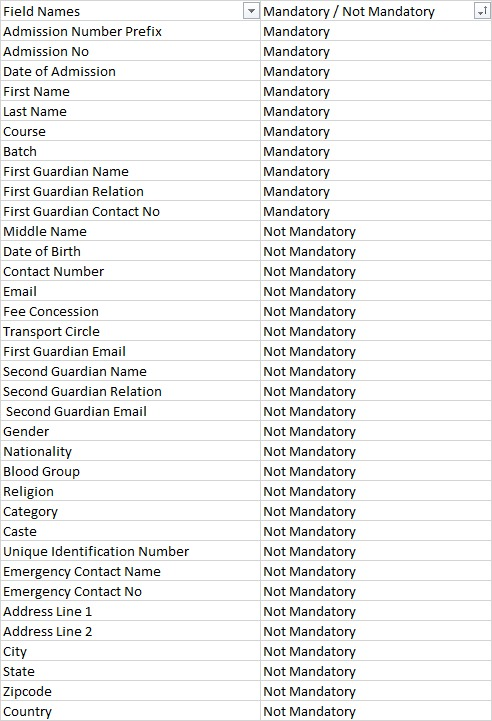
Figure 2
5. If Columns in the excel sheet, example: Data of Birth, Email, Religion, Fee concession, Transport Circle, Caste, etc. are left empty and the data is imported to the system, then you have to manually, enter each student records data and fill each fields manually, which can consume more time and efforts. Hence, it is useful to fill all the required data before importing the excel file to the IMS.