Income
- Income
To Add New Income
Form Fields Description
- — Transaction Category
- — Account
- — Amount
- — Date of Income
- — Payment Method:
- — Description
Data Table View Description
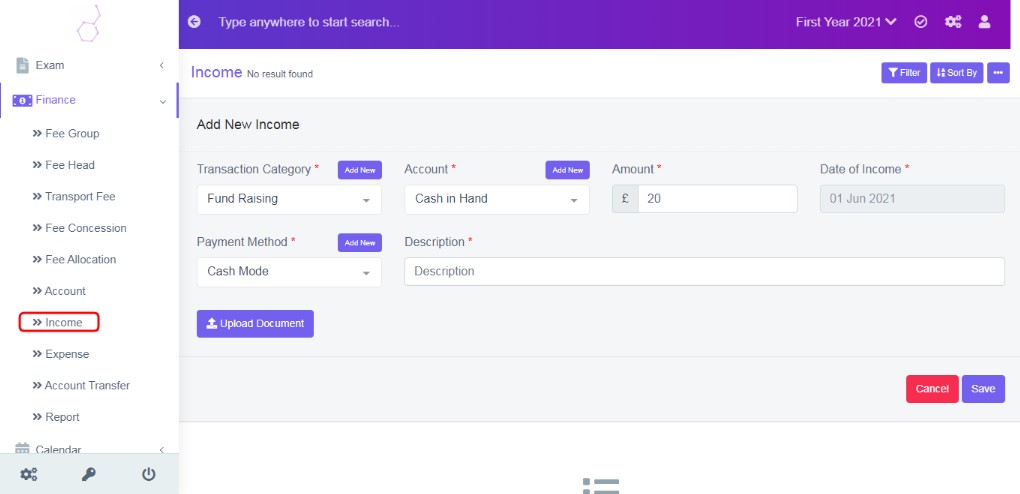
Figure 4
Record all incomes and receipts, choose account, and payment method to record income transaction.
To Add New Income
Click on ‘Add New’, enter the data in the form fields, refer figure:3.
Record all incomes and receipts, choose account, and payment method to record income transaction.
Form Fields Description:
Transaction Category
Select the category of the income from the drop down list. If it is not configured in module configuration, for more details refer Finance Configuration – Transaction category. You can also use ‘Add New’ tab, a pop up to add the details, without navigating to Module configuration.
Account
Select the account from the drop down list.
Amount
Enter the Amount.
Date of Income
Select the date of income
Payment Method
Select payment method from drop down list. For more details about payment method refer Finance Configuration – Payment Method.
Description
Enter description as required.
Data Table View Description:
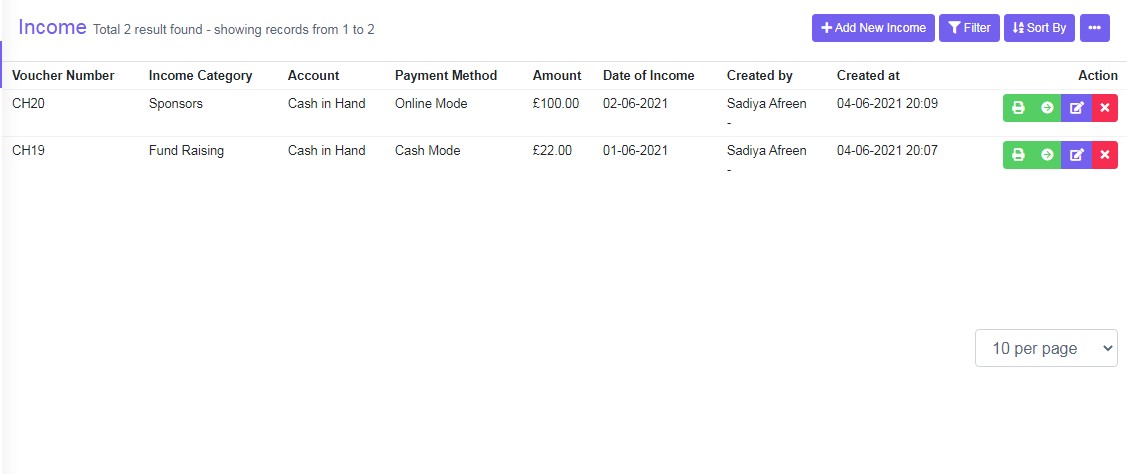
Figure 5The data table view is same data entered in form fields, with additional options which is to print receipt and view details on the screen. Refer figure:5.