Backup
Never loose your database. Schedule daily backups, download backup. Create daily backups manually.
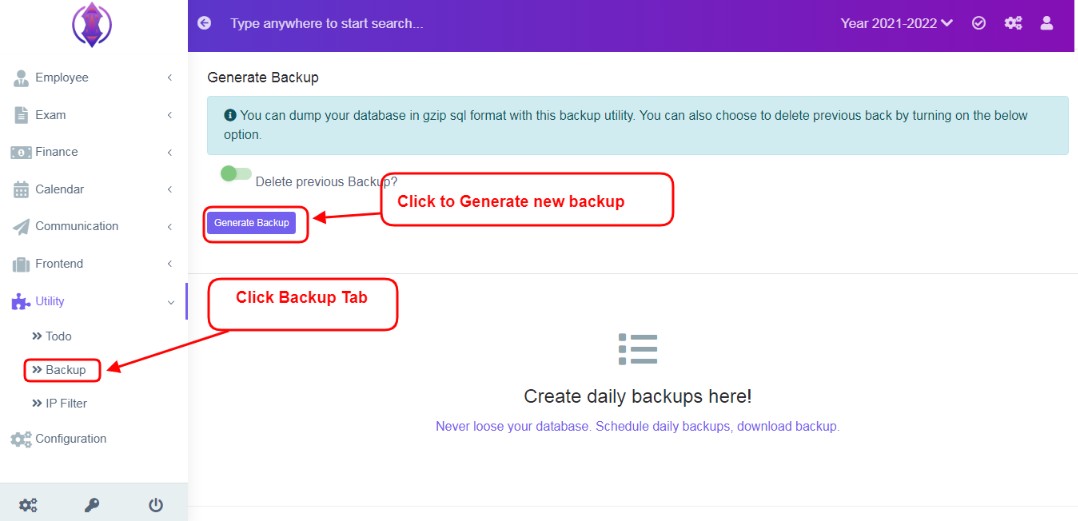
Figure 7 To Generate New Backup:
Click on ‘Backup’ Tab and Click ‘Generate Backup’, refer figure:7, a loading icon will be displayed in middle of screen, once done, “Backup Generated", green popup screen will be displayed on the bottom right hand side of the screen.
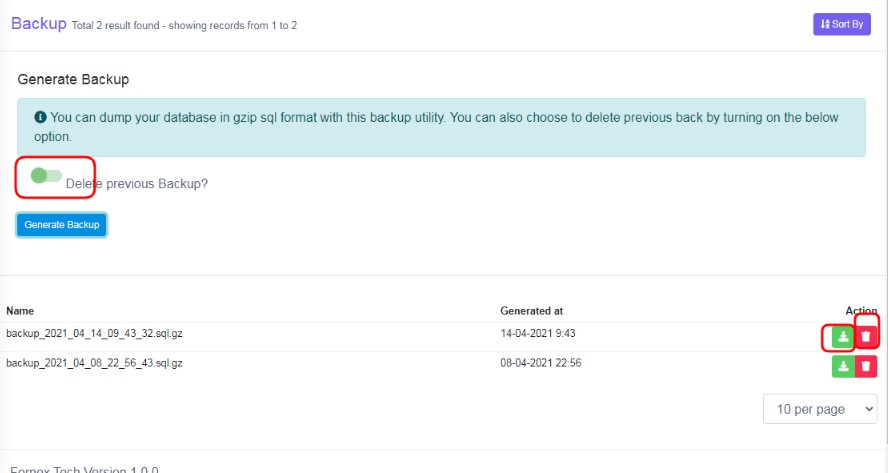
Figure 8Delete previous Backup:
To delete, all the previous backup lists and to generate a new backup only, will be displayed on screen. Before clicking generate a new backup, enable this options  and click Generate Backup tab, all the previous backup records will get deleted
Download Backup:
Click Download Icon  , to download and save the backup file to your local computer.
Delete Backup:
Click Delete Backup Icon, to delete any required backup.
User Sort by option to view, the displayed data table view, according to your requirements.